If you only have an hour to spend on Google's AI results, spend it on your Google Business Profile. In a September 2026 study of 34,742 home-services answers, Google's AI Mode cited Google properties in 95.5% of answers, which includes Business Profiles and their reviews (Cheers). BrightLocal's August 2026 study of 1,355 locations also found Google's own profile the top source for both AI Overviews and AI Mode (BrightLocal).
ChatGPT works differently and rarely cites Google, so this guide is about Google's AI features. As always, these studies are observational and some come from companies that sell related services. Nobody can guarantee what Google's AI says about you, and Google says there is no way to pay for a better local ranking.
What Google says matters
Google's help page on local ranking says results are "mainly based on relevance, distance, and popularity" (prominence) (Google):
- Relevance: how well your profile matches what someone is searching for. "Complete, detailed business info helps."
- Distance: how far you are from the searcher.
- Prominence: how well-known you are, including how many reviews you have and your ratings.
On AI features, Google says no special optimization is required. Your pages need to be indexed, and it recommends keeping your Business Profile information up to date (Google).
The checklist, in order
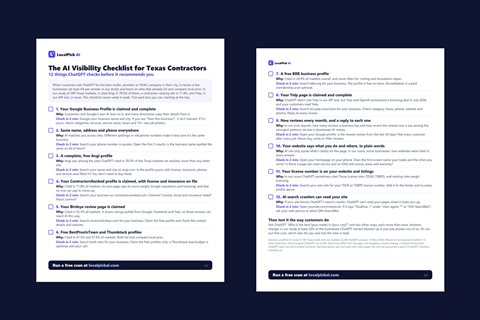
1. Be verified and be the owner
An unverified or unclaimed profile is the biggest gap. Google offers verification by phone or text, email, video call or postcard (a 5-digit code that expires in 30 days; most arrive within 14 days), and reviews can take up to 5 business days after you submit (Google). Only the owner can complete verification. Make sure at least two people you trust are listed as owners, and anyone helping you is a manager (managers can edit and reply but can't delete the profile or remove owners) (Google).
2. Get the name right
Your Business Profile name must match your real-world name. Google doesn't allow adding keywords, service descriptions or locations to the name (for example "Smith Plumbing Best Plumber Dallas"), and breaking this can get a profile suspended (Google).
3. Choose the right categories
Pick the primary category that best describes your main business (for example "Roofing contractor," "HVAC contractor," "Plumber") and add secondary categories for other things you really do. The primary category matters most.
4. List every service you really offer
Add each service (roof replacement, water heater installation, AC repair) with a short, plain description. Don't list services you don't offer.
5. Set your service area honestly
If you travel to customers, list the cities and areas you really serve. Google limits how many areas you can list, so check the current limit in your profile and prioritize your main ones. See how to get recommended in nearby towns.
6. Hours and special hours
Make hours exact, including emergency or after-hours service if you truly offer it. Set special hours for holidays. Wrong hours are one of the most common complaints. See what to do if ChatGPT shows the wrong phone number or hours.
7. Phone and website
Use the main number customers should call and your real website. Keep both consistent with the rest of the web.
8. Write a clear description
Say what you do, where, and for how long, in plain language. Mention your license if you have one. Avoid promotional claims you can't back up.
9. Photos
Add real photos: your trucks, team, jobs in progress and completed work. Google recommends adding photos and videos to show what you offer. Replace blurry or outdated ones.
10. Reviews: ask, reply, repeat
Reviews are part of prominence. Google allows asking customers to leave a review, including with a link or QR code, and prohibits rewards (Google). Ask every customer, reply to every review, and don't buy, write or gate reviews. See how many reviews and how recent and Google's AI review summaries.
11. Keep it active
Post updates, new photos and offers on a regular schedule. We haven't seen evidence that posting changes AI answers, so treat it as customer-facing upkeep rather than a ranking tactic.
Common mistakes
- Keyword-stuffed names. Risk of suspension.
- A virtual office or fake address. Google can suspend these.
- Leaving old information. Old phone numbers and closed locations.
- Ignoring suggested edits. Other people can suggest changes to your listing. Check your email and your profile for edit notices and review them.
- Unanswered reviews.
- Too many managers with too much access. Review who has access every few months.
What this won't do
- It won't make ChatGPT name you. ChatGPT mostly cited directories and ranking sites in our Texas study (Angi in 78.5% of markets, ContractorsRanked in 71.8%, Google domains in 3 of 390). See Google AI Overviews vs AI Mode vs ChatGPT.
- It won't guarantee any placement. Google says there is "no way to request or pay for a better local ranking."
- It won't help if your profile is suspended. Follow Google's guidelines.
A 45-minute plan
| Step | Time |
|---|---|
| Check ownership, verification and who has access | 10 min |
| Fix name, categories, hours, phone, website | 10 min |
| Add or fix services and service area | 10 min |
| Upload 10 real photos | 10 min |
| Reply to unanswered reviews and send review links | 5 min |
Then check again next month.
FAQ
Is the Business Profile still worth the effort if ChatGPT doesn't read it? Yes. It drives Google Maps, Google search and Google's AI, which many customers use.
Do I need to pay Google? The profile is free. Google ads are separate.
Can an agency manage it? Yes, as a manager. Never give anyone your Google password.
Check your profile and more. Run a free scan at localpickai.com. You'll see whether ChatGPT names you, who it names instead, which websites it read, and what to fix first. Free, no signup, about a minute.